
The Federal Energy Regulatory Commission (FERC) offers an online system called eLibrary. eLibrary provides public access to the case documents in FERC energy matters (dockets), including filings by the parties, comments of the public, and decisions or notices issued by FERC. If you’re interested in a specific project or topic, you can eSubscribe to a docket. This allows you to receive e-mail notifications of any future filings, issuances, and submittals in a FERC proceeding. You will also be able to access public documents directly through the links provided in these email notifications.
Benefits of Using eSubscription:
Stay informed: Get automatic updates on projects you're interested in, so you don't have to keep checking manually!
Easy Access: Receive links to new documents directly to your email.
Participate in Dockets: If you want to comment or get involved in a docket, eSubscription ensures you have the latest information.
Free Service: It's completely free to use!
Step by Step Guide: How to Subscribe to a Docket
Step 1:
Register for a free FERC Online account at https://ferconline.ferc.gov/eRegistration.aspx to obtain a FERC ID and set a password.
Note: Without completing the full registration process, you will be limited to eSubscription only. To use FERC’s eFiling or Query Service List, full eRegistration is required.
Step 2:
Check your email for a confirmation message from [email protected]. Open the message and click the link provided to confirm your email address and complete your registration.
Note: Make sure your email provider does not block emails from FERC.gov and check your spam folder if you do not see the confirmation email.
If you have questions or problems, please contact ferconlinesupport@ferc.gov for assistance.
Step 3:
Once your account is registered, go to FERC Online and login using your email address (or FERC ID) and password.
Step 4:
Click on eSubscription
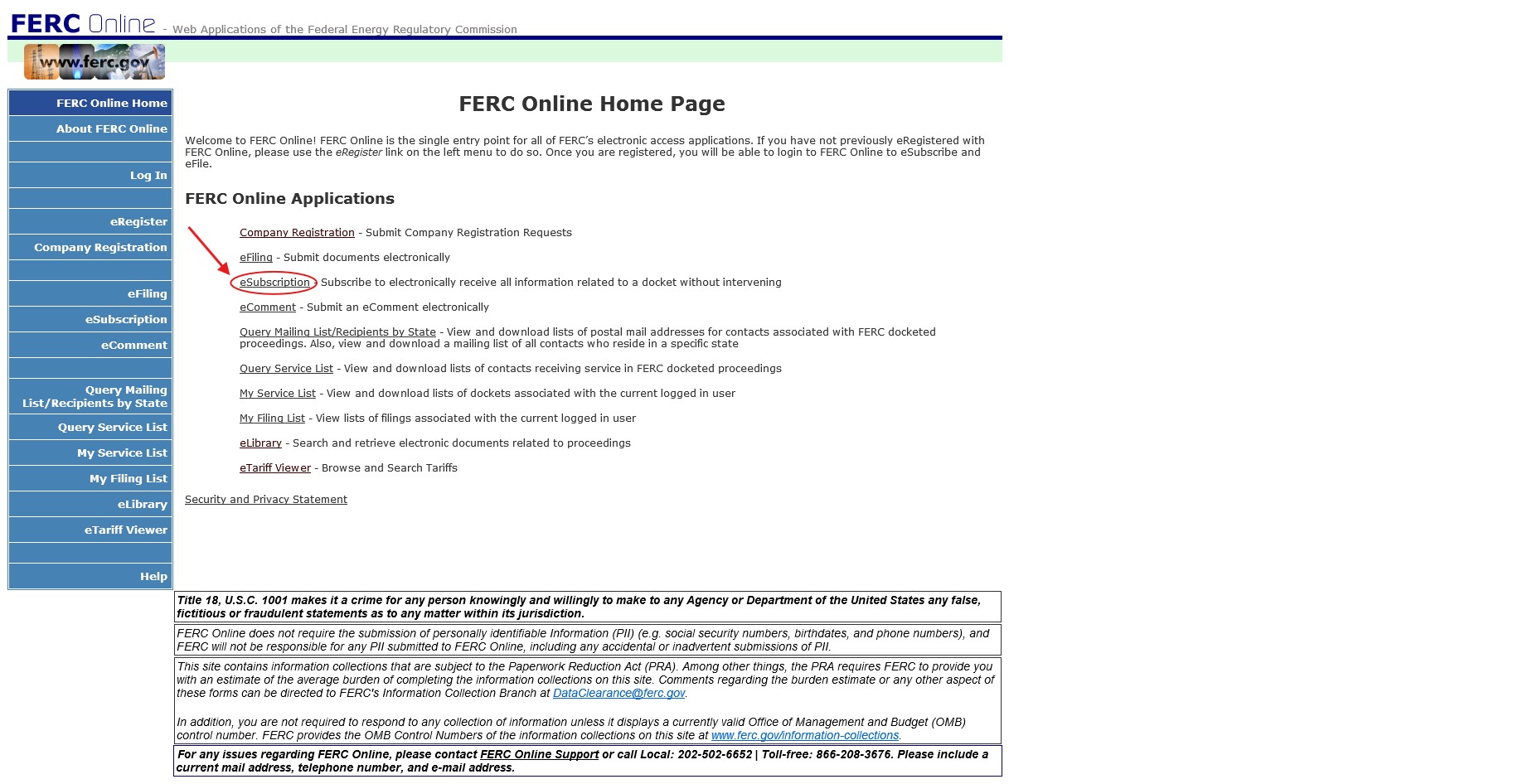
Step 5:
Click on Add New Subscription
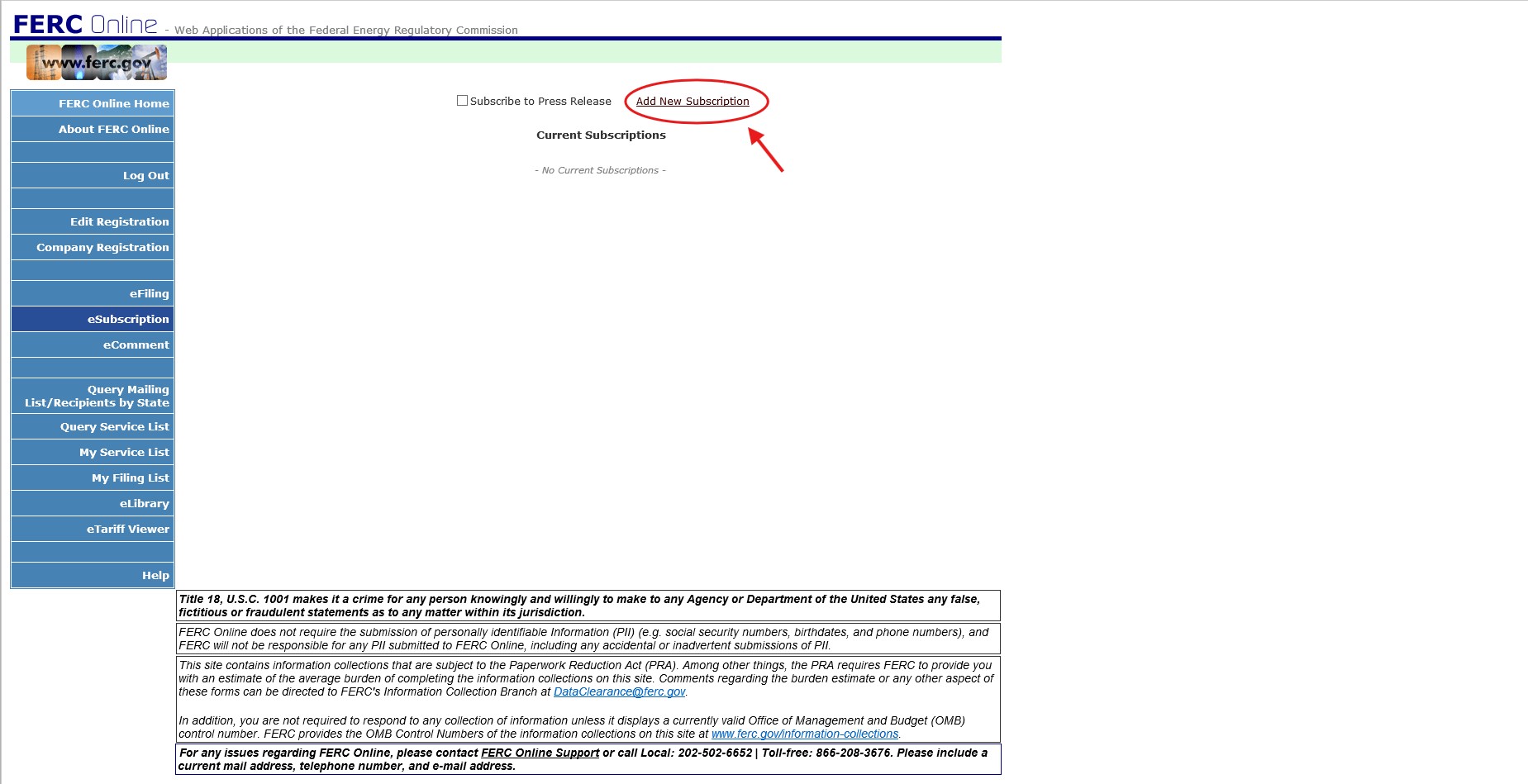
Step 6:
Enter the unique docket number for the project or proceeding you want to follow (e.g., CPXX-XXX-).
Tip: You can find docket numbers on FERC’s eLibrary system. Simply search by project name under “Keyword Search” or by Date Range or by Industry Sector, etc. Docket numbers are also listed on public notices and project websites. If you need assistance in finding a docket number, please contact the Office of Public Participation at [email protected]
After entering in the docket numbers, click Search.
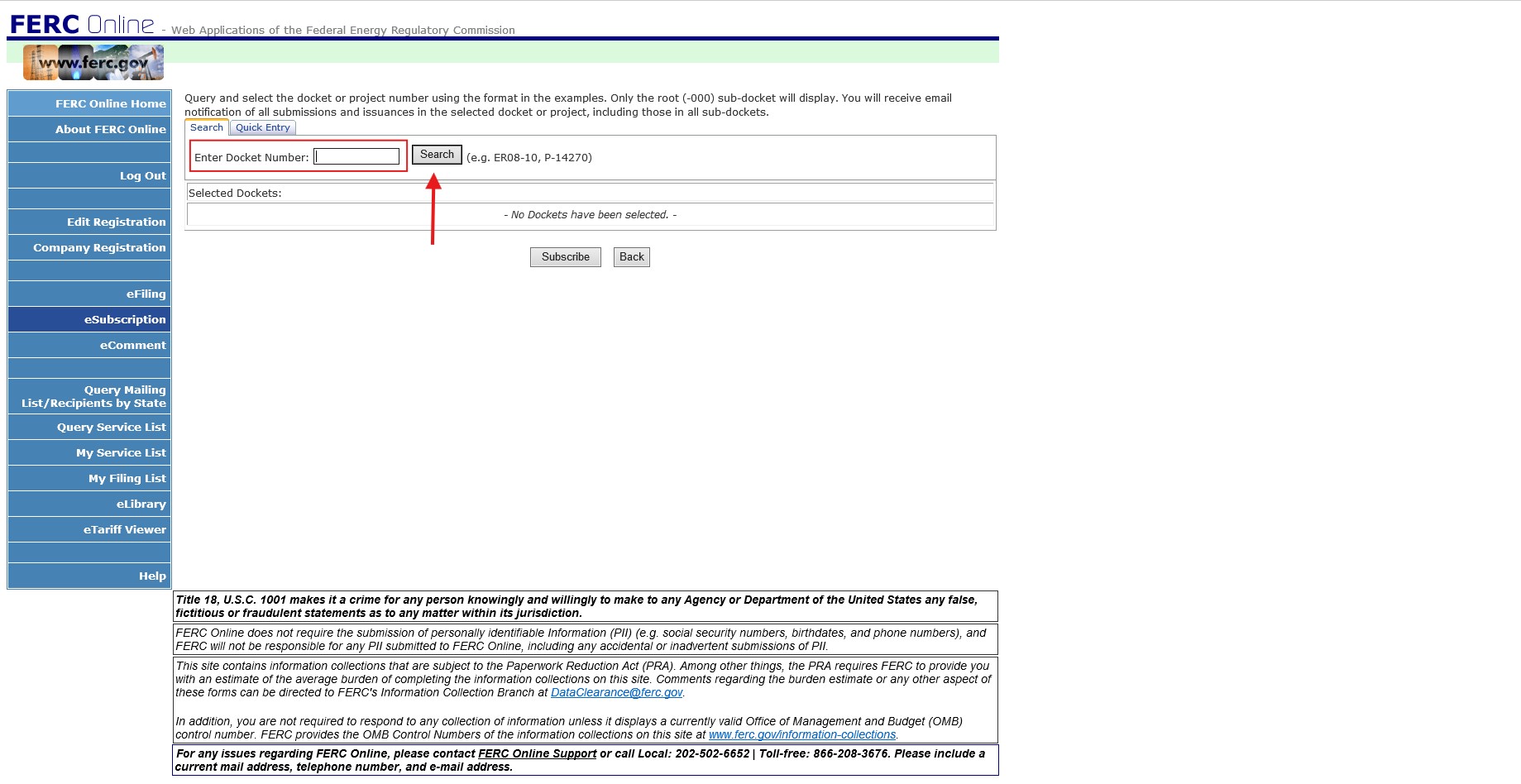
Step 7:
Click on the blue plus (+) symbol on the right side of the docket listing.
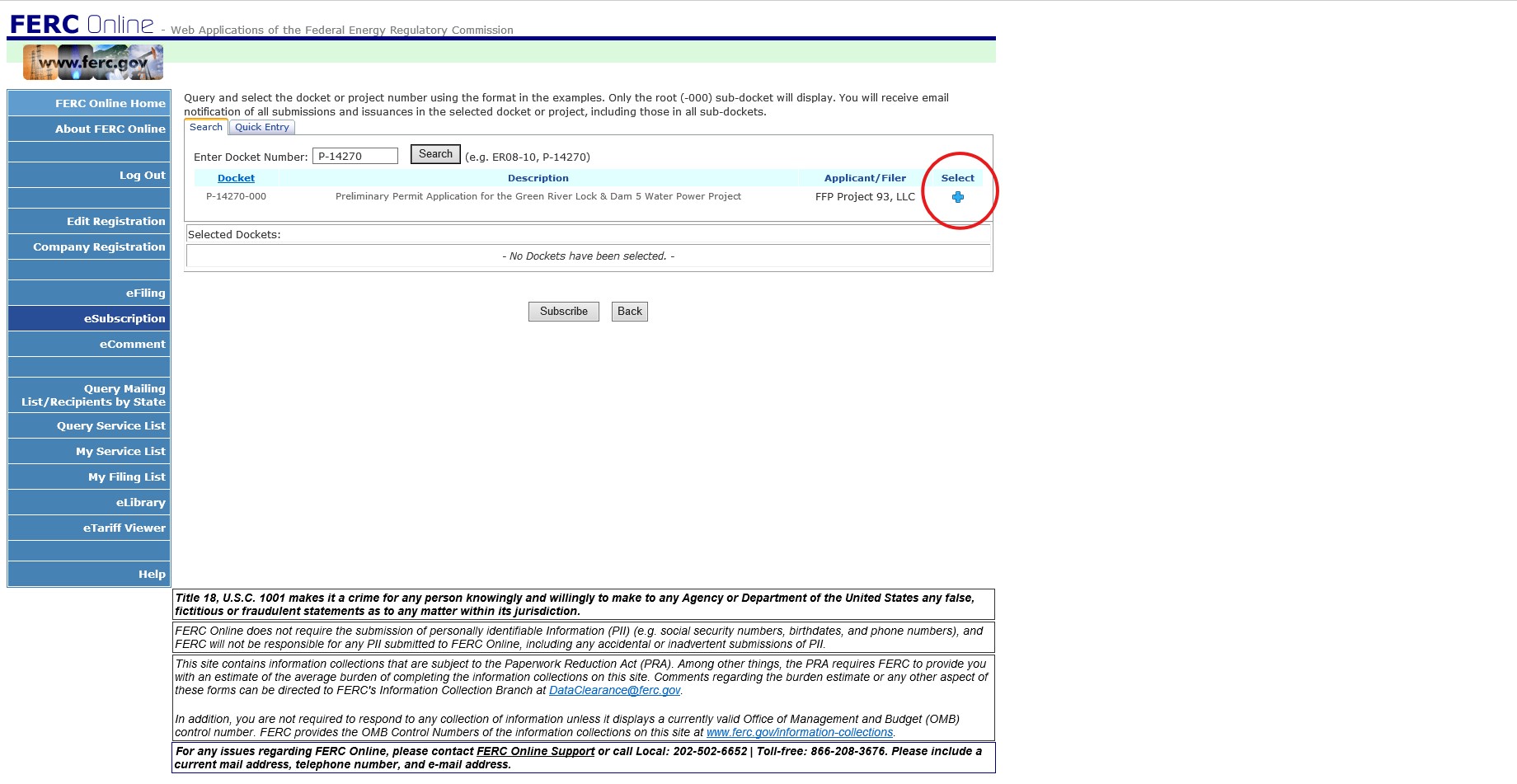
Step 8:
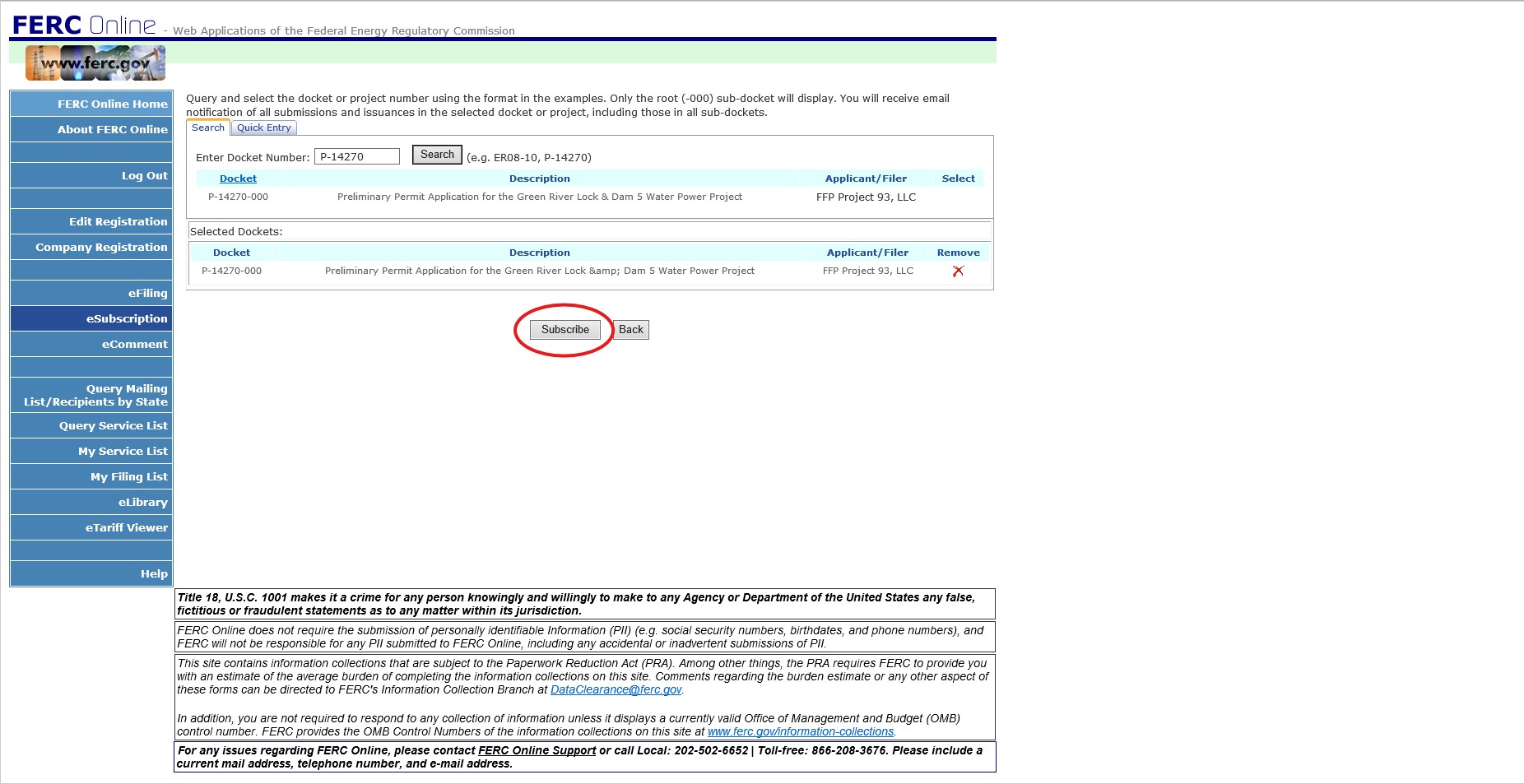
Click the Subscribe button to complete your eSubscription. You will now receive email notifications when documents are filed under that docket.
FAQs
Q. Can I subscribe to more than one docket at a time?
A. Yes, you can subscribe to as many dockets as you want. Simply repeat the steps to add additional docket numbers.
Q. Will I be notified immediately when a document is filed?
A. E-mail notifications are typically sent within several hours of filing depending on system processing.
Q. Can I cancel my eSubscriptions?
A. Yes. Login to FERC Online and select eSubscription. From there, you can update or remove any docket subscriptions.
Q. Does subscribing mean I am a party to the proceeding?
A. No, eSubscription is for informational purposes only. it does not confer legal party status, nor does it constitute intervention in the proceeding. To participate formally, you must file a motion to intervene.
Quick Links
Contact Information
-
FERC Online SupportHours of Operation 8:00 -5:00 ET | TTY: 202-502-8659Telephone: 202-502-6652Toll-free Telephone: 1-866-208-3676Email: [email protected]
-
News MediaEmail: [email protected]
-
AccessibilityTelephone: 202-502-8659 (TTY)Toll-free Telephone: 1-866-208-3372Fax: 202-208-2106Email: [email protected]